01 // The Challenge
MSP techs stand up new Active Directory environments constantly — for new tenants, for lab rebuilds, for failovers. Done by hand in Server Manager it's a slow, checklist-driven, error-prone process: promote the server, install ADDS, configure DNS, set the domain functional level, create the first OUs and groups, configure the password policy, join admin machines, and so on. Every step is a chance to forget something.
02 // The Scripts
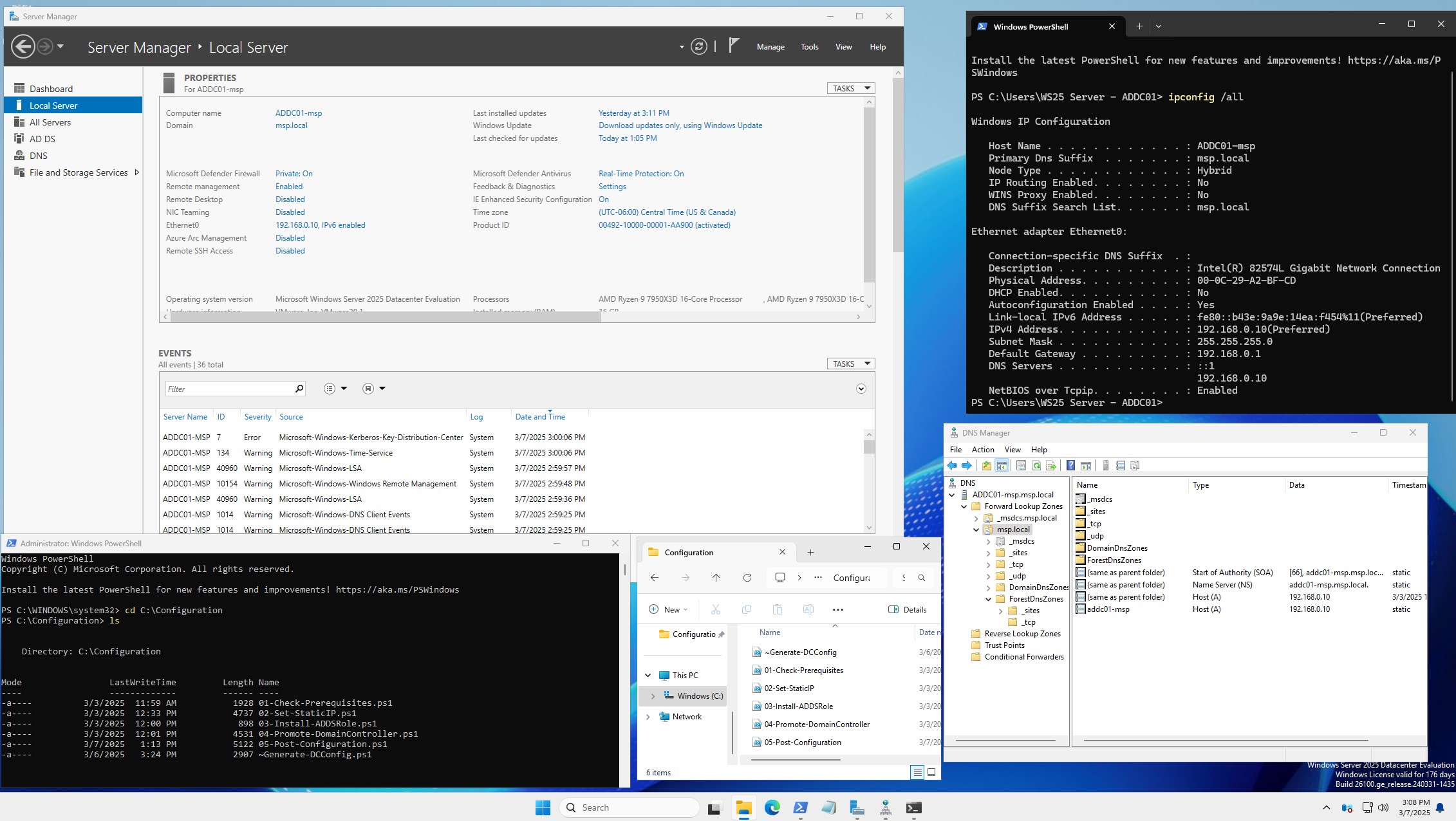
Five PowerShell scripts, run in order as Administrator on a fresh Windows Server 2025 install. Each one logs to its own text file under C:\ADSetup\.
- 01 · Prerequisites — confirms Windows Server 2025 and admin rights, warns when C: has less than 20 GB free, and stops with a clear message on a hard failure.
- 02 · Static IP — finds the active network adapter and its gateway, turns off DHCP, assigns a fixed address, and points DNS at a public resolver so the server can reach the internet before promotion.
- 03 · Role install —
Install-WindowsFeature AD-Domain-Services -IncludeManagementTools. - 04 · Forest creation — prompts for the Administrator password (it also becomes the DSRM recovery password), then
Install-ADDSForestcreates themsp.localforest with integrated DNS and reboots. - 05 · Post-configuration — renames the server to
ADDC01-msp, checks that AD Web Services is running, points the DC's DNS at itself, adds upstream DNS forwarders, and turns off SMBv1.
Alongside the pipeline, the repo carries domain-join scripts for Windows 10/11 and RHEL 9 clients (realmd + sssd), plus a third-party sample dataset (about 3,000 users, 20 groups, 21 OUs) for testing against a populated directory.
03 // Design Choices
One stage per script. Each script does one job and exits non-zero when it fails, so a broken run stops at the step that broke instead of burying the error under later steps. The reboot after promotion falls between scripts 04 and 05, and 05 offers its own restart after the rename.
Fail fast. Every script runs with Set-StrictMode -Version Latest and $ErrorActionPreference = "Stop", so a typo or a failed cmdlet ends the run instead of leaving a half-configured server.
Some steps check first. The static-IP script leaves an address that's already set alone, and post-configuration can be re-run: it skips the rename when the name already matches and only adds forwarders that aren't there yet. Forest promotion is the one-shot step, not built to be re-run.
Fixed lab values. The domain, hostname, address and forwarders are set inside the scripts rather than passed in: they build one known lab, not any tenant.
04 // Results
msp.local forest, hostname and DNS setup, because those values live in the scripts.05 // Next Steps
What an MSP rollout would still need, and the scripts don't do yet: take the domain name, NetBIOS name, address, forwarders and forest/domain functional level as parameters instead of hard-coded values; seed a standard OU and security-group layout that checks before it creates; apply fine-grained password policies (PSOs) to privileged groups; and write a full PowerShell transcript plus a JSON summary of what each run created. After that, a small deployment form for techs who don't live in PowerShell, and a GPO-import step from a signed baseline.
Where this went next. This single-server script was the seed for a much larger project — a full two-site Active Directory forest (two domain controllers, DNS, DHCP, a certificate authority, and Windows + Linux clients) provisioned from bare install media with Ansible on KVM, then tested with live disaster-recovery drills. Read it here: Building a Two-Site Active Directory From Code.
Source is open at github.com/marky224/Active-Directory-Domain-Controller-Provisioning.